How to Translate a PDF Without Losing Formatting
Hi Translate
2026-01-04 · 10 min read
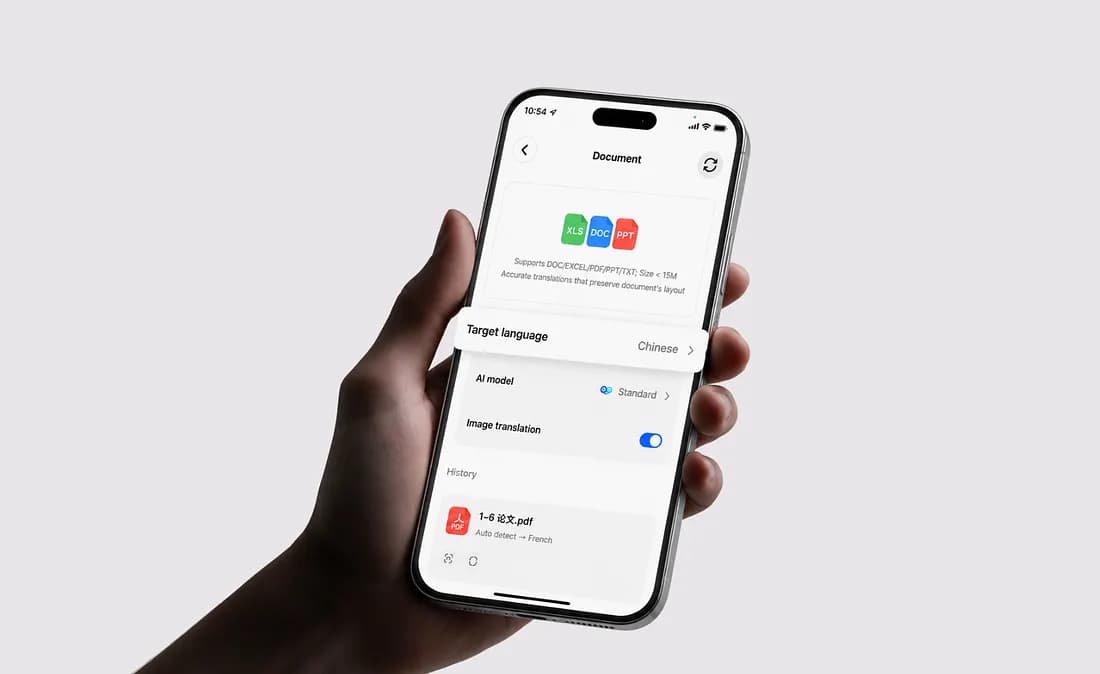
The Complete HiTranslate PDF Translation Guide (2026)
Anyone can translate a paragraph.
Translating an entire PDF without breaking its layout is a completely different challenge.
If you’ve ever translated a research paper, contract, product manual, or scanned document, you’ve probably experienced at least one of these problems:
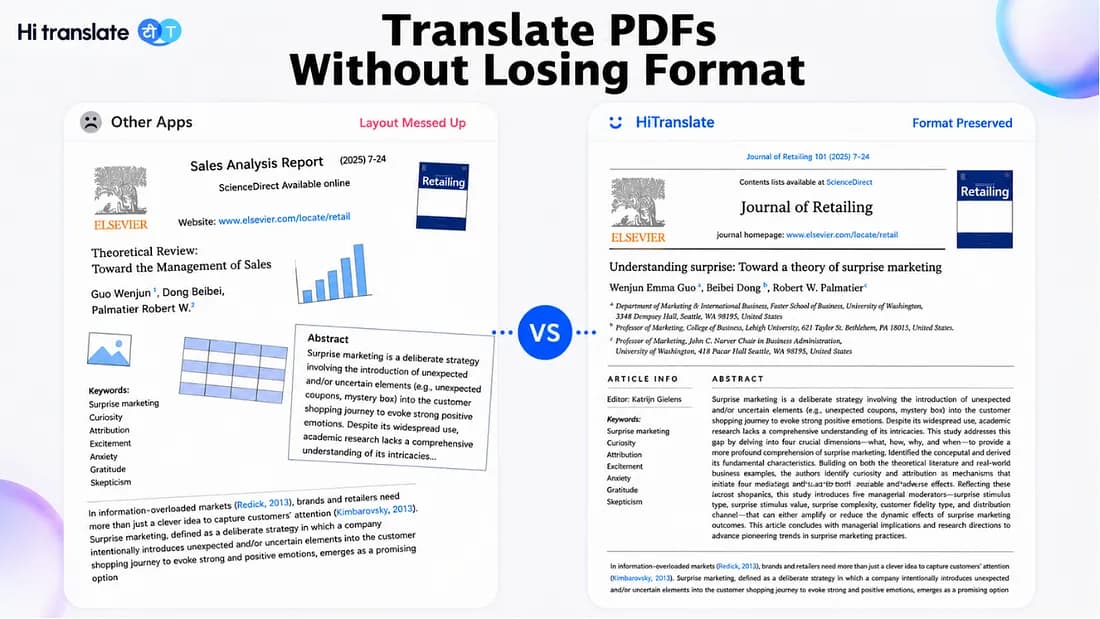
The translated PDF loses its formatting.
Tables become unreadable.
Images no longer match their captions.
Two-column research papers are translated in the wrong reading order.
Scanned PDFs cannot be translated without using a separate OCR tool.
You spend more time fixing the document than actually reading it.
Let’s be honest — nobody wants to spend an extra hour repairing a PDF after it’s already been translated.
For most people, the problem isn’t the translation itself.
It’s everything that happens after the translation.
That’s exactly why HiTranslate PDF Translator was built.
Instead of translating isolated text, HiTranslate combines AI translation, OCR, document layout analysis, and layout reconstruction into a single workflow — helping users translate PDFs while preserving as much of the original document structure as possible.
Whether you’re reading academic papers, reviewing international contracts, translating technical documentation, or localizing product manuals, HiTranslate is designed to make multilingual documents easier to understand — and easier to use afterward.
 Press enter or click to view image in full size
Why More Users Choose HiTranslate for PDF Translation
Many translation tools can convert words from one language to another.
The real question is:
Can you still use the document after it’s translated?
For complex PDFs, readability matters just as much as translation quality.
HiTranslate approaches PDF translation differently.
Before translating a single sentence, it analyzes the document structure — including headings, paragraphs, tables, images, reading order, and page hierarchy — so the translated document remains organized instead of becoming plain translated text.
The result is a workflow that helps users spend less time fixing formatting and more time actually reading the document.
Built for Documents — Not Just Text
Traditional translation tools are primarily designed for text.
PDFs are different.
A single document may contain:
- Multiple columns
- Tables
- Charts
- Images
- Footnotes
- Mathematical formulas
- References
- Mixed languages
These elements work together as one document.
HiTranslate translates the document as a whole instead of treating every paragraph independently.
That means headings remain recognizable, tables stay easier to follow, and visual relationships between images and text are preserved whenever possible.
For students, researchers, and international teams, that makes a significant difference.
Compare HiTranslate with Other PDF Translation Solutions
Different translation tools are designed for different tasks.
General-purpose translators are excellent for translating short passages of text, while document translators need to handle formatting, structure, OCR, and page layout at the same time.
The comparison below summarizes the typical strengths of several popular solutions.
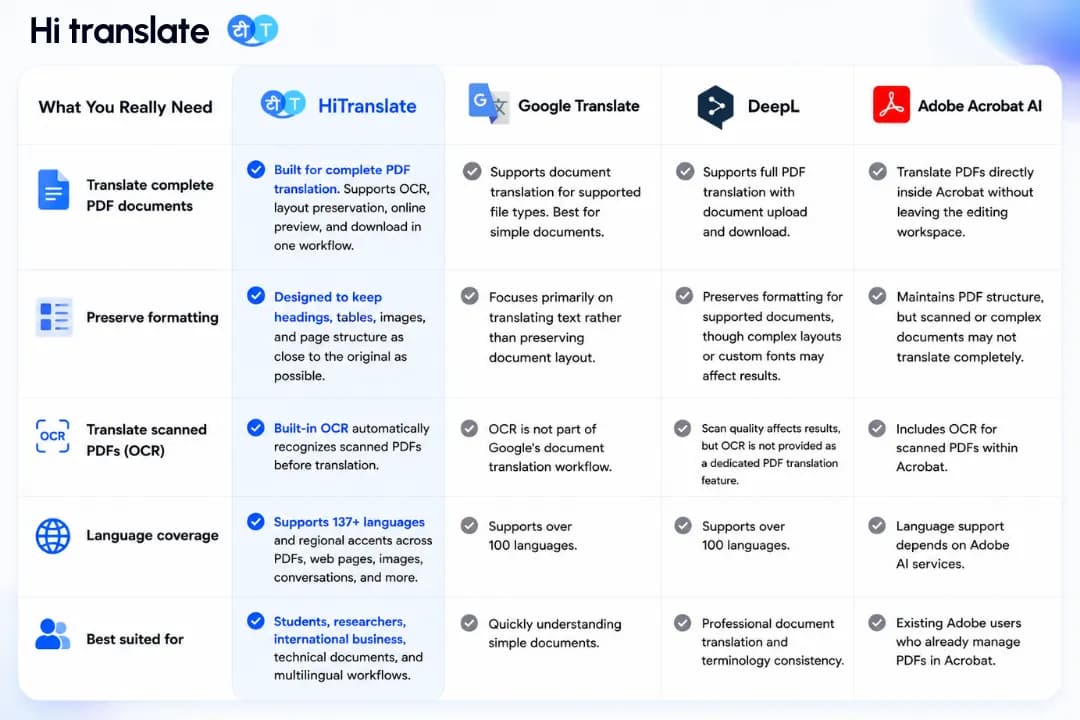
Note: Feature descriptions are based on publicly available product information and common workflows as of 2026. Actual functionality may vary by product version, subscription plan, or future updates.
Why this comparison matters
If you only need to translate a few sentences, almost any translation tool can help.
But if you’re working with research papers, contracts, technical manuals, scanned PDFs, or image-rich documents, preserving the document itself becomes just as important as translating the language.
That’s where HiTranslate focuses its optimization — helping users keep documents readable instead of simply producing translated text.
5 Reasons Translated PDFs Break (and How HiTranslate Helps)
Most PDF translation problems aren’t caused by poor translation models.
They’re caused by document structure.
Understanding these challenges makes it much easier to choose the right translation workflow.
1. Formatting Breaks After Translation
One of the biggest frustrations is losing the original layout.
Headings become paragraphs.
Lists disappear.
Tables shift.
Images move to different positions.
Even when every sentence is translated correctly, the document becomes harder to read.
HiTranslate analyzes page structure before translation to help preserve headings, tables, images, and document hierarchy whenever possible.
2. Two-Column Papers Lose Their Reading Order
Most academic journals use two-column layouts.
General translation tools often process content from left to right without understanding the intended reading sequence.
As a result, paragraphs from different columns may become mixed together.
HiTranslate performs document layout analysis before translation, helping reconstruct the logical reading order for complex academic documents.
3. Tables Become Difficult to Understand
Price lists, technical specifications, financial reports, and product catalogs rely heavily on tables.
If rows or columns shift during translation, important information can become confusing.
HiTranslate attempts to preserve the relationship between table content and surrounding text, making translated documents easier to review.
4. Images and Captions Become Disconnected
User manuals and engineering documents often rely on diagrams.
When captions no longer match their images, understanding the document becomes much harder.
HiTranslate analyzes page elements together so visual content and translated text remain aligned whenever possible.
5. Scanned PDFs Cannot Be Translated Directly
Many important PDFs are actually scanned images rather than editable documents.
Without OCR, there is no text for AI to translate.
HiTranslate automatically detects scanned PDFs and performs OCR before translation.
OCR accuracy depends on scan quality. Blurred pages, handwritten annotations, unusual fonts, stamps, or low-resolution scans may require minor manual correction before translation, especially in documents where accuracy is critical.
How to Translate a PDF Without Losing Formatting with HiTranslate
Once you understand why PDF translation is challenging, the actual workflow becomes surprisingly simple.
HiTranslate combines document analysis, OCR, AI translation, and layout reconstruction into a single process, eliminating the need to switch between multiple tools.
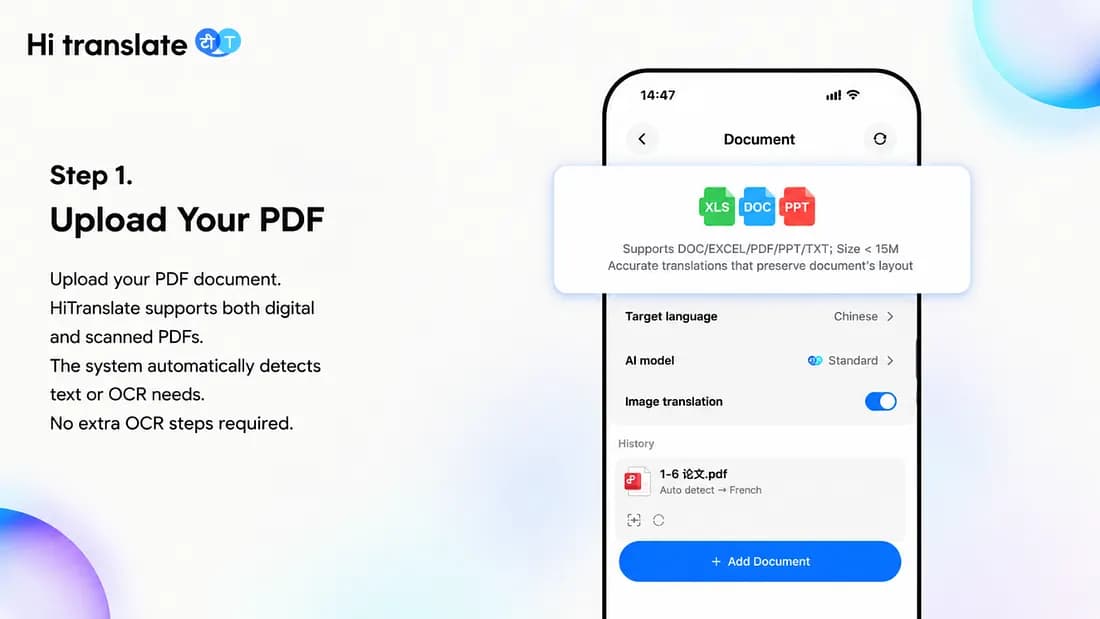
Step 1. Upload Your PDF
Start by uploading your PDF document.
HiTranslate supports both standard digital PDFs and scanned PDF files.
Become a Medium member
Once uploaded, the system automatically detects whether the document contains selectable text or whether OCR is required before translation.
No separate OCR software or manual preprocessing is needed.
Press enter or click to view image in full size
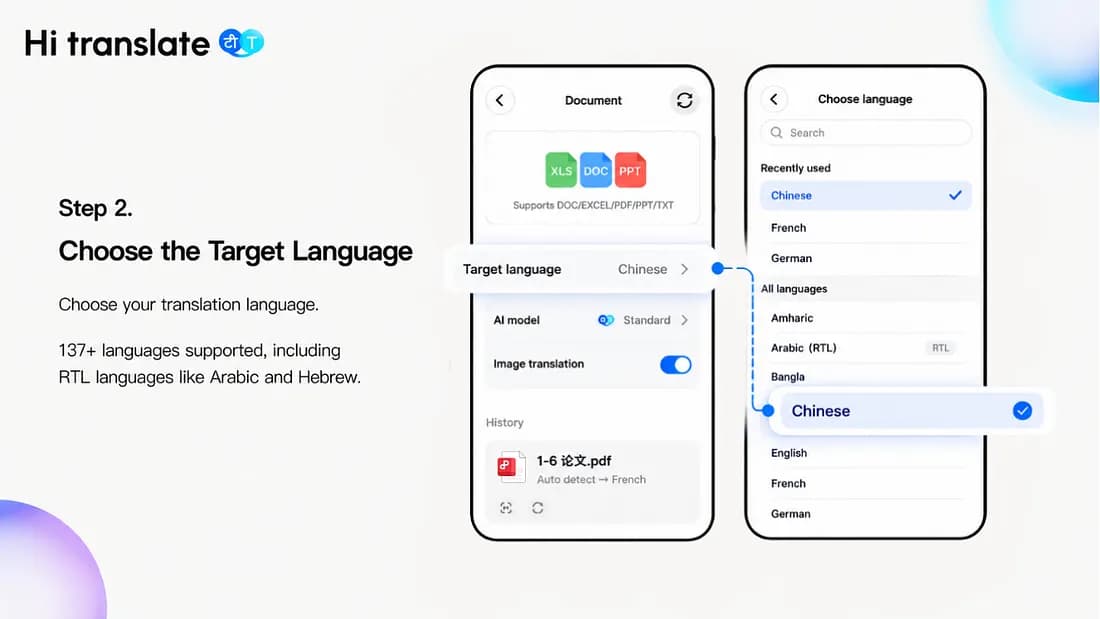
Step 2. Choose the Target Language
Select the language you’d like your PDF translated into.
HiTranslate supports 137+ languages, covering major global languages used in education, business, research, and international communication.
It also supports right-to-left (RTL) languages such as Arabic and Hebrew, where maintaining document structure requires additional layout handling beyond simple text translation.
Press enter or click to view image in full size
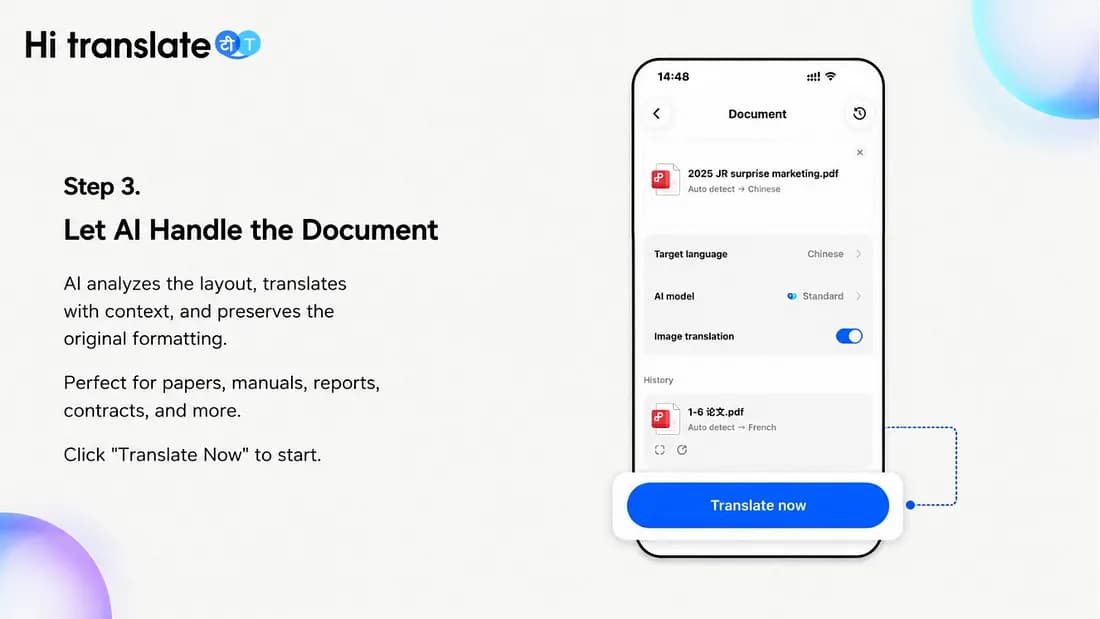
Step 3. Let AI Handle the Document
This is where HiTranslate differs from ordinary translation tools.
Instead of translating paragraph by paragraph, HiTranslate first performs document layout analysis, identifying text blocks, headings, tables, images, and the intended reading order — similar to how a person naturally scans a page.
The system then translates the document using context-aware AI, helping maintain terminology consistency across the entire document rather than treating every sentence independently.
Finally, HiTranslate reconstructs the translated PDF using spatial mapping, preserving the relationships between different page elements instead of simply reflowing translated text.
This document-level workflow helps maintain readability for:
- Research papers
- Technical documentation
- Product manuals
- Business contracts
- Multi-page reports
- Image-rich PDFs
Press enter or click to view image in full size
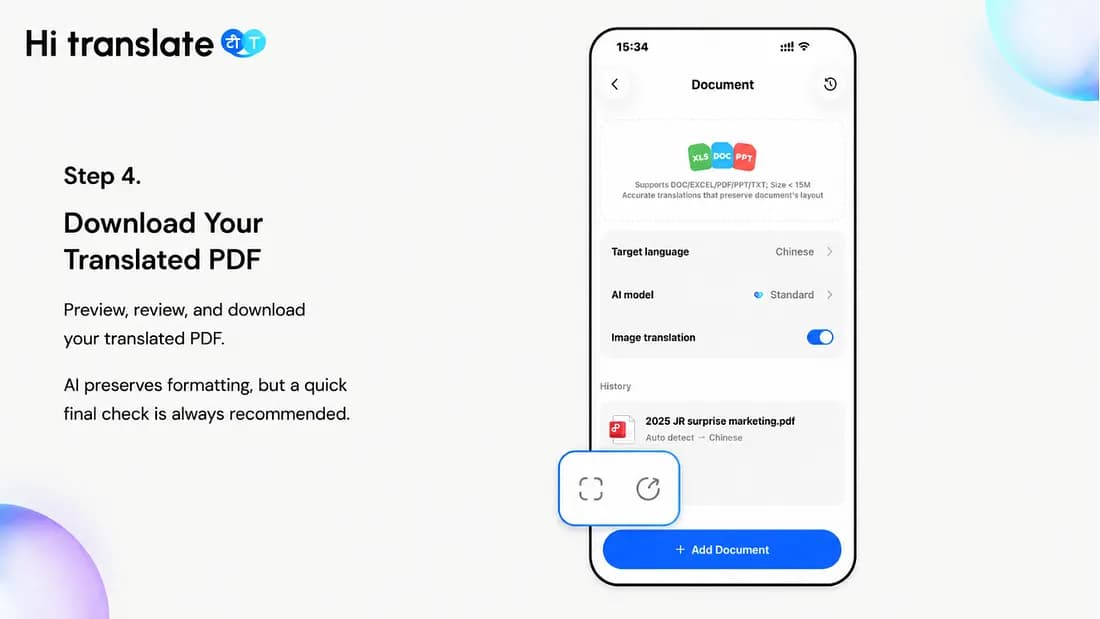
Step 4. Download Your Translated PDF
Once processing is complete, preview your translated document, zoom in to review the layout and details, then download it when you’re ready.
HiTranslate is designed to preserve document readability and structure, making the translated PDF easier to review, share, or continue working with.
While HiTranslate preserves formatting in most situations, highly complex graphics, low-resolution scans, handwritten annotations, or dense mathematical formulas may still require a quick visual review — especially for legal, medical, engineering, or other mission-critical documents.
AI significantly reduces manual work, but final verification is always recommended when accuracy is essential.
Press enter or click to view image in full size
Why Professionals Choose HiTranslate
For many users, translation quality is only part of the equation.
The real goal is to finish the job faster without creating additional work afterward.
HiTranslate is designed around real document workflows rather than isolated text translation.
Academic Research
Research papers often include two-column layouts, citations, figures, formulas, and specialized terminology.
HiTranslate helps researchers and students spend less time correcting formatting and more time understanding the content.
International Business
Contracts, quotations, product specifications, and supplier documentation require both accurate translation and clear document organization.
By preserving tables and document structure whenever possible, HiTranslate helps international teams review multilingual documents more efficiently.
Technical Documentation
Technical manuals combine diagrams, tables, workflows, safety instructions, and procedural steps.
HiTranslate analyzes these document elements together instead of translating isolated paragraphs, producing documents that remain easier to navigate.
Everyday Productivity
Whether you’re translating resumes, certificates, invoices, travel documents, or training materials, HiTranslate simplifies the process from upload to download in a single workflow.
Best Practices for Better PDF Translation
Even with modern AI, a few simple habits can improve translation quality.
Translate a Sample First
For long documents, translate two or three representative pages before processing the entire file.
This helps verify terminology, formatting, and overall translation quality.
Keep the Original PDF
Always save the original version.
It makes terminology verification, collaboration, and version comparison much easier later.
Double-Check Critical Information
AI translation continues to improve rapidly, but important details should always be reviewed manually, including:
- Personal names
- Dates
- Currency values
- Technical specifications
- Product model numbers
- Contract clauses
- Legal terminology
Use OCR for Scanned Documents
If text cannot be selected inside the PDF, it is probably a scanned document.
HiTranslate automatically performs OCR before translation whenever necessary, reducing manual preparation.
AI Assists — It Doesn’t Replace Human Judgment
AI translation dramatically improves productivity.
However, documents used for legal agreements, regulatory compliance, medical decisions, patent filings, or official submissions should always receive professional human review before being used in critical situations.
Frequently Asked Questions
Can HiTranslate preserve the original PDF formatting?
HiTranslate is designed to preserve headings, tables, images, and document structure whenever possible.
Because translated text often differs in length from the source language, no AI translation tool can guarantee pixel-perfect reproduction for every PDF.
However, HiTranslate significantly reduces formatting issues and minimizes the amount of manual editing required afterward.
Can HiTranslate translate scanned PDFs?
Yes.
HiTranslate includes built-in OCR that automatically recognizes scanned documents before translation.
OCR quality depends on the clarity of the original scan, so low-quality images may require minor corrections.
What languages does HiTranslate support?
HiTranslate supports 137+ languages, making it suitable for global communication, multilingual business, academic research, and international collaboration.
About HiTranslate
HiTranslate is an AI-powered multilingual communication platform developed by TRANSSION. Trusted by more than 800 million accumulated users worldwide, HiTranslate supports 140 languages and a wide range of regional accents, helping people communicate naturally across cultures and break down language barriers in work, study, travel, and everyday life.
While PDF translation is one of HiTranslate’s most popular features, it’s only part of a much broader multilingual experience. HiTranslate also helps users translate:
- PDF documents and other files
- Web pages
- Images
- Live conversations
- Voice calls
- Chat messages
- AI writing and grammar improvements
Instead of switching between multiple translation apps, users can handle a wide range of multilingual tasks within one intelligent platform — making cross-language communication faster, simpler, and more efficient.
Learn more: https://hitranslate.ai
相关文章
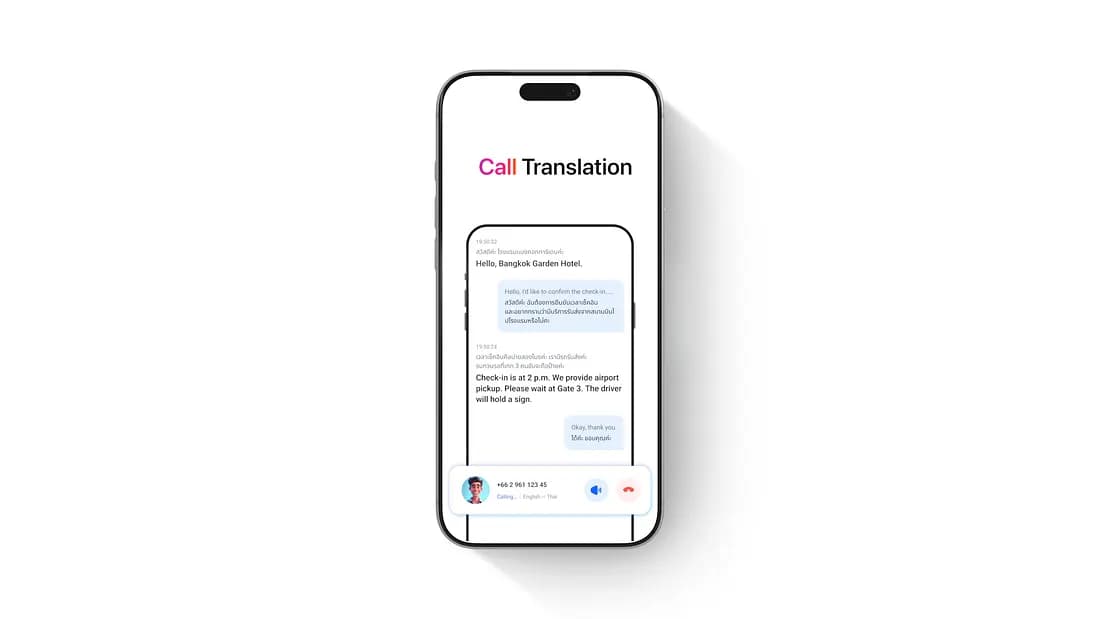
Hi Translate: Call Any Hotel Abroad in Your Own Language
You’ve booked a hotel in Bangkok. The day before departure, you want to call and confirm two things: what time check-in starts, and how to get from the airport to the hotel.


Real-Time Meeting Translation & AI Notes | Hi Translate
If you’ve ever walked out of a cross-language meeting thinking “I think I got the main points,” you already know the problem.